
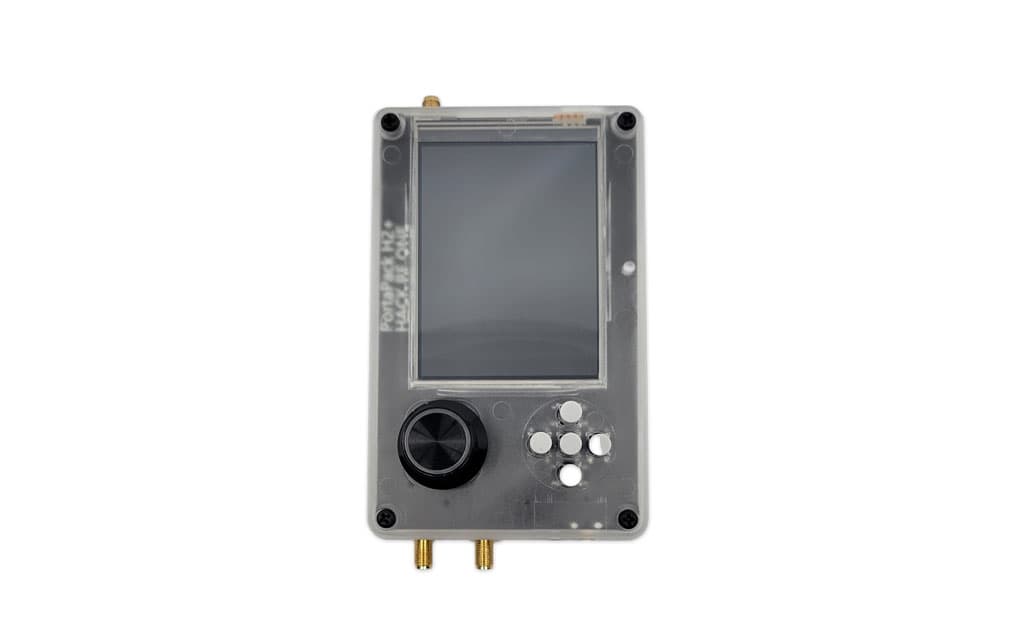
PortaPack H2 + HackRF: Your Standalone SDR Field Station
The HackRF One is already one of the most capable SDR platforms available. The PortaPack H2 removes the laptop from the equation entirely — adding a touchscreen display, controls, speaker, microphone, and battery support to create a fully self-contained RF research platform.
Paired with Mayhem firmware, the PortaPack H2 becomes a Swiss army knife for radio frequency security research in the field.
What Is the PortaPack H2?
The PortaPack is an add-on board designed specifically for the HackRF One. The H2 variant includes:
- 3.2" touchscreen display (320x240 IPS)
- Navigation controls — 5-way D-pad, two additional buttons
- Speaker and microphone for audio monitoring and transmission
- microSD card slot for data capture and replay storage
- Real-time clock for timestamped captures
- Portable form factor — runs from USB battery pack
Mayhem Firmware
The stock HackRF/PortaPack firmware is functional but limited. Mayhem firmware (maintained by the community at github.com/portapack-mayhem) dramatically expands capability:
- 60+ built-in applications
- Improved signal detection and display
- Expanded protocol support
- Active development with frequent updates
Installing Mayhem
- Download the latest release from the Mayhem GitHub releases page
- Copy
mayhem.binto your microSD card root - Boot PortaPack with SD card inserted — Mayhem loads automatically
Key Applications
Spectrum Analyzer
The built-in spectrum analyzer displays signal activity across a configurable frequency range. Essential for:- Initial site survey before an engagement
- Identifying active frequencies in an area
- Locating interfering signals
Signal Recorder / Replay
One of the most used features for RF security testing:Applications → Capture → Set frequency → Record
Applications → Replay → Select file → TransmitThis is how you record and replay:
- Remote control signals — garage doors, gate openers, key fobs (fixed code systems)
- RF remote controls — industrial machinery, drones, model vehicles
- Wireless sensors — temperature sensors, alarm sensors, contact switches
Note: Rolling code systems (like modern car fobs using KeeLoq or AUT64) cannot be replayed directly without a brute force or cryptographic attack. Fixed code systems are directly replayable.
POCSAG / Pager Decoder
POCSAG is a paging protocol still used by hospitals, emergency services, and industrial facilities. Operating around 152-158 MHz in North America, POCSAG messages are typically unencrypted:Applications → Receivers → POCSAG
Set frequency to local paging frequency
Messages display in real-timeIn security assessments of healthcare facilities, POCSAG sniffing has revealed patient information, doctor schedules, medication alerts, and code callouts transmitted in cleartext. This is a legitimate and significant finding.
ADS-B Receiver
Automatic Dependent Surveillance–Broadcast (ADS-B) is the protocol commercial aircraft use to broadcast position, altitude, speed, and identification at 1090 MHz:Applications → Receivers → ADS-BThe PortaPack displays nearby aircraft in real time. Useful for validating antenna performance and understanding the RF environment at altitude.
APRS / Packet Radio
Automatic Packet Reporting System (APRS) operates at 144.390 MHz in North America. Amateur radio operators, weather stations, and APRS trackers use it to broadcast position data. The PortaPack can decode APRS packets live.Frequency Manager
Maintain a library of frequencies of interest:- Local public safety frequencies
- Building access reader frequencies
- Known IoT device frequencies
- Site-specific RF targets
Jammer Applications (Training Use Only)
Mayhem includes jamming capabilities in restricted/training-only modes. Jamming is illegal on licensed frequencies without authorization. These features exist for:- Authorized RF interference testing
- Demonstrating wireless attack vectors in training environments
- Research in RF-shielded facilities
Field Operations Workflow
Site Survey
- Load Spectrum Analyzer
- Sweep your frequency range of interest
- Note active frequencies, signal strengths, and patterns
- Load Frequency Manager with targets for focused monitoring
Capture and Analysis
- Lock onto a target frequency
- Record with Signal Recorder
- Review the capture — identify modulation, timing patterns
- Transfer to laptop (via SD card) for deeper analysis with GNU Radio or Universal Radio Hacker (URH)
Protocol Identification
When you encounter an unknown signal:- Note center frequency, bandwidth, and modulation type from the spectrum display
- Record a sample
- Load in URH on your laptop
- Use URH's auto-detect to identify modulation
- Decode the protocol manually or with built-in decoders
Integration with Desktop SDR Tools
The PortaPack H2 is not a replacement for desktop SDR analysis — it's the field capture platform. Your workflow typically involves:
- PortaPack in the field: Capture, quick analysis, frequency confirmation
- Laptop with GNU Radio/URH: Deep protocol analysis, custom demodulation
- HackRF + PortaPack for transmission: Once you understand the protocol
Antenna Considerations
The stock antenna covers the full HackRF range but isn't optimized for any specific band. For field work:
- ANT500 telescoping antenna: Good general-purpose portable option
- Yagi directional antenna: Longer range for specific frequencies
- Discone antenna: Wide-band reception for site surveys
Conclusion
The PortaPack H2 + HackRF One combination is the most capable portable SDR platform available at its price point. The touchscreen interface, Mayhem firmware, and self-contained operation make it viable for field work that previously required a full laptop setup.
For RF security assessments, wireless protocol research, and signal intelligence gathering in authorized engagements, this combination covers 1 MHz to 6 GHz from a shirt pocket.
For authorized security research only. Transmission on licensed frequencies requires appropriate authorization.